
Signs Your Electric Gate Needs Professional Repair
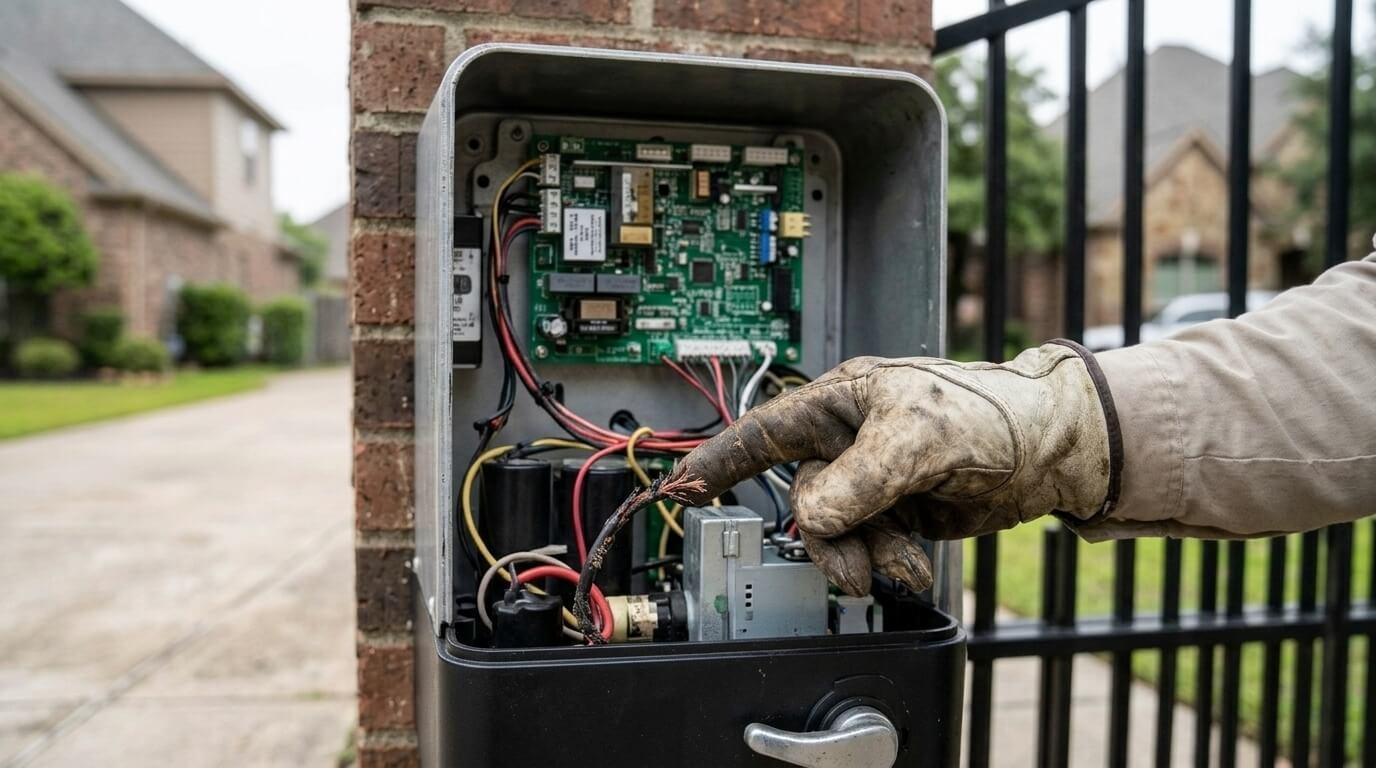
Electric gates rarely die without warning. More often they send signals for weeks or months: a hesitation here, a new noise there, a remote that needs two presses instead of one. Those signals are easy to dismiss because the gate still works, but they're usually telling you something specific about a motor, a sensor, a power supply, or a wearing part. Learning to read them helps you schedule electric gate repair on your terms, before a failure strands a vehicle, leaves the property open, or turns a small fix into a big one.
This guide is written for homeowners, property managers, and business owners in League City. It organizes the signs by how you notice them (what you see, hear, smell, and experience), explains what each one often means, and helps you judge how urgent it is.
Why Early Signs Matter
An electric gate is a system of moving parts and electronics. Wear in one place quietly increases the load on another. A hinge that's slowly stiffening makes the motor work harder. A battery that's slowly weakening makes the board behave oddly. A sensor that's slowly getting dirty makes the gate hesitate. None of these is dramatic on its own, but together they add up to a failure at an inconvenient time.
Catching them early generally means a simpler repair and a lower chance of an emergency call.
Signs You Can See
The Gate Looks Uneven or Out of Alignment
A gate that no longer sits level, rubs against a post, or doesn't meet its partner leaf evenly is showing structural wear. That puts extra strain on the operator.
Visible Rust, Corrosion, or Damage
Orange staining, flaking paint, bent bars, cracked welds, or corroded connections can weaken the gate and its electronics, especially in humid climates.
Loose or Damaged Wiring
Frayed, chewed, pinched, or loose wires near the operator, sensors, or keypad are a hazard and often explain intermittent faults.
Indicator Lights That Behave Oddly
Operator and sensor lights usually show status. Lights that are off when they should be on, blinking in patterns, or flickering are worth noting.
Water or Moisture in Control Boxes or Keypads
Condensation, water stains, or corrosion inside enclosures can cause erratic behavior and long-term damage.
Gaps, Sag, or a Gate That Doesn't Fully Close
If the gate stops short of its closed position or leaves a gap, something in the limits, mechanics, or sensors isn't right.
Signs You Can Hear
|
Sound |
What It Often Suggests |
|
Grinding |
Worn gears, rollers, or drive parts |
|
Squealing |
Dry hinges or rollers |
|
Clicking with no movement |
Motor, gear, or relay issue |
|
Humming without motion |
Motor engaged but mechanically stuck |
|
Rattling |
Loose hardware or mounting |
|
Popping or banging |
Binding, impact, or a failing component |
New or louder noises are one of the earliest warning signs. Squeaks often respond to lubrication, but grinding and clicking usually point to something that needs inspection.
Signs You Can Smell
A Burning or Scorched Smell
This is a serious sign. It can indicate an overheating motor, a failing component, or an electrical fault. Shut off power at the breaker if you can do so safely, stay clear of the equipment, and call a professional.
A Hot Operator or Control Box
If the operator or enclosure feels unusually hot to the touch, the system may be overloaded or failing.
Signs You Notice in How the Gate Behaves
Slower or Jerkier Travel
A gate that takes longer to open or shudders partway is showing wear in the drive, hinges, rollers, or power supply.
It Stops Partway or Reverses Without a Reason
If sensors are clean and nothing is in the way, nuisance stops can indicate misaligned or failing sensors, wiring faults, or limit problems.
It Opens or Closes on Its Own
Unexpected movement can point to a failing control board, wiring issues, interference, or moisture. It's both a security and a safety concern.
Inconsistent Response to Remotes or Keypads
Remotes that work only up close, keypads with missed presses, or devices that work one day and not the next often signal weak batteries, receiver problems, or wiring faults.
It Works in the Morning but Not Later (or the Reverse)
Heat, moisture, sun exposure on solar panels, or an overheating motor can cause time-of-day patterns. Noting when it happens helps a technician track the cause.
It Fails After Storms or Outages
Gates that struggle after bad weather may have surge damage, moisture intrusion, or weakened batteries.
It Needs More Resets Than Before
If you're power-cycling the gate or re-programming remotes more often, the system is telling you something is degrading.
Sign Severity: How Urgent Is It?
|
Sign |
Likely Meaning |
Urgency |
|
Burning smell, sparks, or a hot operator |
Electrical or motor fault |
Stop using; call promptly |
|
Gate opens or closes on its own |
Control or wiring fault |
Stop using; call promptly |
|
Safety sensors not stopping the gate |
Safety device failure |
Stop using automatic function; call promptly |
|
Exposed or damaged wiring |
Electrical hazard |
Keep clear; call promptly |
|
Gate stuck, won't move, or stops partway repeatedly |
Mechanical or electrical fault |
Call soon |
|
Grinding, clicking, or humming |
Drive or motor wear |
Call soon |
|
Slower or jerkier travel |
Developing wear |
Schedule service |
|
Remote or keypad inconsistency |
Battery, receiver, or wiring issue |
Check batteries; call if unresolved |
|
Visible rust or sag |
Structural wear |
Schedule service |
|
Failures after storms |
Surge or moisture |
Schedule inspection |
When in doubt, treat safety-related signs as urgent.
Signs of Age and Wear Across the System
Beyond individual symptoms, some patterns suggest the system is aging:
-
Repairs are happening more often
-
Different parts keep failing in succession
-
Parts for an older operator are getting harder to find
-
The gate is struggling with traffic it wasn't sized for
-
Safety features lag behind current expectations
These patterns are good prompts for a professional inspection and a conversation about repair versus replacement.
What You Can Safely Check Before Calling
A few checks are reasonable for most owners:
-
Replace remote and keypad batteries
-
Check the breaker or power switch, without opening any housing
-
Look at the operator's lights and note the pattern
-
Clean sensor lenses and check alignment
-
Clear debris from tracks and the gate's path
-
Try the manual release, only as the manufacturer directs, to see whether the gate moves freely
-
Write down what happened, when, and any recent events like storms or impacts
Avoid opening the operator, bypassing sensors, or forcing the gate. Those steps can hide the problem or cause injury.
What a Professional Visit Involves
-
A conversation about the signs, including when they started and how they've changed
-
Inspection of the gate, hinges or rollers, posts, operator, wiring, sensors, and access devices
-
Testing of power, controls, limits, and safety reversal
-
Diagnosis, with a plain-language explanation of what's causing the signs
-
A written estimate before additional work begins
-
The repair, followed by recalibration
-
Final testing and a summary of what was done and what to monitor
Staying Ahead of the Signs
-
Watch a full open-and-close cycle every few weeks
-
Lubricate and inspect moving parts as recommended
-
Keep sensors clean and trimmed free of vegetation
-
Test batteries on remotes, keypads, and backup systems
-
Check for rust and loose hardware twice a year
-
After storms, check power, sensors, and enclosures for moisture
-
Schedule an annual professional inspection
For properties that also have garage door repair needs, some owners schedule inspections for gates and garage doors together, since the two systems share similar sensors, openers, and wiring practices.
Choosing a Provider
Because electric gates combine mechanical, electrical, and safety systems, look for a provider who explains what they find. Useful questions include:
-
Are you licensed and insured?
-
Do you work on my operator brand and gate type?
-
Will you test safety sensors and reversal?
-
Is your estimate written and itemized?
-
What warranty covers parts and labor?
A local company such as Level Up Garage Door Pros is an example of the kind of provider League City property owners can compare. If you'd like to see how a focused provider describes its approach, reading about Electric Gate Repair can help you judge whether their process covers the inspection and safety testing described above.
Frequently Asked Questions
How soon should I call after noticing a sign? Safety-related signs, like burning smells, erratic movement, or failed sensors, call for prompt attention. Slower travel or a new noise can usually be scheduled.
Can signs come and go? Yes. Intermittent symptoms often point to loose connections, weak batteries, moisture, or an aging board, and they tend to worsen over time.
Is it okay to keep using a gate that makes a new noise? Minor squeaks are usually fine for a short time. Grinding or clicking is worth having inspected soon.
Do all signs mean I need a new gate? No. Most signs point to repairable problems, and a technician can tell you whether repair or replacement makes more sense.
Why does my gate act up after rain? Moisture in control boxes, keypads, or wiring is a common cause. A professional can find and fix the entry point.
How often should I have an electric gate inspected? Once a year is a reasonable baseline, with more frequent checks for heavy use.
Final Thoughts
An electric gate usually tells you when it's heading toward trouble: a new noise, a slower cycle, an odd light, a remote that needs a second press, or a smell you shouldn't ignore. Pay attention to those signals, handle the simple checks yourself, and treat anything involving safety, burning smells, or erratic movement as a reason to stop and call. A little attention now can save you from a locked-out morning later.

 English
 Arabic
 French
 Spanish
 Portuguese
 Deutsch
 Turkish
 Dutch
Dutch
 Italiano
 Romaian
 Portuguese (Brazil)
 Greek
Greek