
POS Software for Smarter Sales and Business Management
POS Software: A Comprehensive Guide to Selecting the Best System for Your Company
Every sale your business makes passes through a single point: the moment a customer pays. Sales management software controls that moment, and when it is chosen well, it also controls inventory, reporting, staff activity, and customer relationships behind the scenes. This guide explains what POS software does, which features matter, and how to select a system that fits your business.
What Is POS Software?
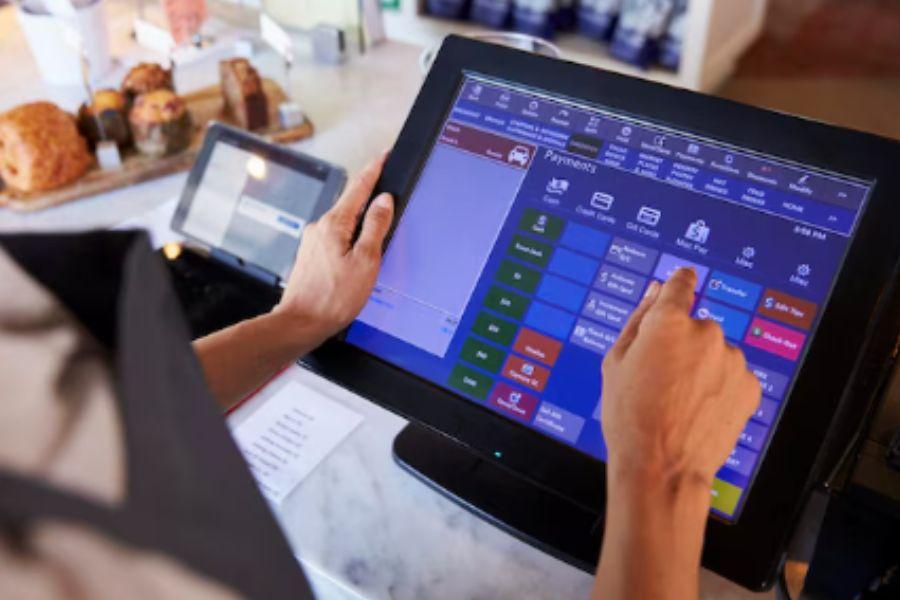
POS software is a digital system that instantly records corporate data and handles sales transactions. It runs on hardware such as tablets, touchscreen terminals, barcode scanners, receipt printers, and card readers. Modern POS software functions as a central hub that links sales, stock levels, staff, and customers on a single platform, as opposed to a basic cash register that merely computes totals.
How Does POS Software Work?
When a cashier scans an item or selects it on screen, the software pulls the price from its database, applies any discounts or taxes, and totals the order. The customer pays by cash, card, or mobile wallet, and the system records the transaction instantly. At the same moment, inventory counts update, sales reports refresh, and a receipt is printed or sent by email or text. Because everything is stored digitally, owners can review performance at any time without counting paper slips.
Types of POS Software
Cloud-Based POS
Cloud systems store data on remote servers and are accessed through an internet connection. They are popular because they require low upfront investment, update automatically, and let owners check sales from anywhere. Most also include an offline mode that syncs data when the connection returns.
On-Premise POS
On-premise systems are installed on local computers and servers. They give businesses direct control over data and can work without internet access, but they usually need higher upfront costs, manual updates, and in-house technical support.
Mobile POS
Mobile POS runs on smartphones or tablets paired with a portable card reader. It suits food trucks, market stalls, pop-up shops, and service providers who need to take payments on the move.
Key Features to Look For
Inventory Management
Strong inventory tools track stock in real time, send low-stock alerts, manage suppliers, and support purchase orders. Features such as variants, bundles, and batch tracking are valuable for retailers with many product options.
Sales Reporting and Analytics
Good reporting shows best-selling products, peak trading hours, profit margins, and employee performance. These insights help you make decisions about pricing, staffing, and purchasing rather than relying on guesswork.
Payment Processing
Look for software that accepts cards, contactless payments, digital wallets, and split payments. Check whether you must use the vendor's payment processor and compare transaction fees, since these can add up significantly over time.
Customer Management
Built-in customer profiles record purchase history and preferences. Loyalty programs, gift cards, and targeted promotions encourage repeat visits and increase the value of each customer.
Employee Management
Staff permissions, shift tracking, and commission calculations keep operations organized. Role-based access ensures that only authorized users can issue refunds or change prices, which reduces errors and internal theft.
Integrations
Your POS should connect with accounting tools, e-commerce platforms, and marketing services. Integration removes duplicate data entry and keeps online and in-store records consistent.
POS software Pakistan helps businesses simplify billing, manage inventory, track sales, and improve daily operations through one reliable system.
Benefits of Using POS Software
Faster checkout: Quick scanning and multiple payment options reduce queues and improve the customer experience.
Fewer errors: Automated pricing and tax calculations remove common manual mistakes.
Accurate stock control: Real-time counts prevent overselling and help you avoid tying up cash in slow-moving products.
Better decision-making: Clear data reveals trends that are difficult to notice otherwise.
Simpler compliance: Digital records make tax reporting and audits more manageable.
POS Software for Different Industries
Retail businesses benefit most from barcode scanning, product variants, and multi-store inventory. Restaurants need table management, kitchen display integration, split bills, and tip handling. Salons and service businesses rely on appointment booking and staff scheduling. Grocery stores require weighing scale support and fast checkout for high volumes. Choosing a system built for your industry saves you from awkward workarounds later.
How to Choose the Right POS Software
Define Your Needs First
List the tasks your business performs daily, the number of registers or users you need, and any special requirements.By doing this, you can avoid paying for features that you won't utilise.
Understand the Full Cost
Pricing models include monthly subscriptions, one-time licenses, and transaction-based fees. Also consider hardware, setup, training, support plans, and add-on modules. A low monthly fee can hide expensive extras.
Test Before Committing
Most providers offer free trials or demos. Let your staff try the interface, since a system that is confusing during a busy shift will cost you more than it saves.
Check Support and Security
Reliable customer support matters when a problem occurs during business hours. Verify that the service makes frequent backups, employs encryption, and conforms with payment card security regulations.
Plan for Growth
Select software that can handle more products, users, and locations as your business expands, so you are not forced to migrate to a new system later.
Common Mistakes to Avoid
Many businesses choose software based only on price or brand popularity. Others skip staff training, which leads to poor adoption and wasted features. Failing to confirm hardware compatibility and ignoring contract terms, such as cancellation fees, are also frequent errors. Taking time to research avoids these problems.
Final Thoughts
POS software is far more than a tool for taking payments. It is the operational backbone of a modern business, connecting sales, inventory, customers, and staff in one place. By identifying your needs, comparing features and costs, testing options, and prioritizing support and security, you can select a system that saves time, reduces errors, and supports long-term growth. The right POS software does not just record your sales; it helps you increase them.
Explore practical business resources for improving sales tracking, inventory control, payment processing, and everyday operational efficiency.

 English
 Arabic
 French
 Spanish
 Deutsch
 Turkish
 Dutch
Dutch
 Italiano
 Russian
 Romaian
 Portuguese (Brazil)
 Greek
Greek