
Convert Raster Images to Vector Graphics Guide
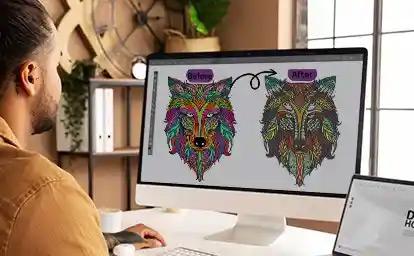
Convert Raster Images to Vector Graphics: A Beginner-Friendly Guide
You've got a logo file. It looks fine on your screen. Then you try to blow it up for a banner, a billboard, or an embroidery design, and it turns into a pixelated mess.
Frustrating, right?
That's the fundamental problem with raster images. They're built from tiny colored squares called pixels. Stretch them too far, and those squares become visible. Blurry edges. Jagged curves. A logo that looks like it was photographed through a screen door.
The fix is to convert raster images to vector graphics. It's one of those behind-the-scenes tasks that most people never think about, until they desperately need it.
Let's break down what vector conversion is, why it matters, and how to do it properly.
What's the Difference Between Raster and Vector?
Think of it this way. A raster image is like a mosaic made of tiny tiles. A vector image is like a drawing made with a compass and ruler.
Raster Images
Raster images are made of pixels. Every digital photo you've ever taken is a raster image. Common formats include JPG, PNG, GIF, and BMP.
The more you zoom in, the more you see individual pixels. Scale it up beyond its original resolution, and the image degrades.
Vector Graphics
Vector graphics are made of mathematical paths. Instead of pixels, they use points, lines, and curves defined by equations. Common formats include AI, EPS, SVG, and PDF.
Scale a vector image to any size, from a business card to a billboard, and it stays perfectly sharp. No blur. No pixelation. Just clean, crisp edges.
Why You'd Want to Convert Raster Images to Vector Graphics
There are plenty of practical reasons to make the switch.
Infinite Scalability
A vector logo works at any size. That means one file handles everything from a tiny embroidered left-chest logo to a massive trade show banner.
Cleaner Embroidery and Print
Embroidery machines, vinyl cutters, and printing presses all prefer vector files. They read clean paths and produce clean output. Raster files confuse these machines and produce sloppy results.
Smaller File Sizes
Believe it or not, vector files are often smaller than high-resolution raster files. Because they store math instead of millions of pixels, they take up less space.
Easier Editing
Want to change the color of a vector logo? Click the shape, pick a new color, done. With a raster image, you're stuck with pixel-level editing that's tedious and imprecise.
Professional Flexibility
Designers, printers, and embroiderers all ask for vector files. Having one ready makes every future project easier.
How Raster to Vector Conversion Actually Works
The process is called vectorization or image tracing. Here's the basic idea.
Automatic Tracing
Software analyzes the raster image and attempts to detect edges, shapes, and color boundaries. It then recreates those shapes as vector paths.
This works reasonably well for simple, high-contrast images. It struggles with photographs, gradients, and complex details.
Manual Tracing
A skilled designer opens the raster image in vector software and manually draws the paths on top of it. This takes longer but produces far better results, especially for logos and detailed artwork.
Hybrid Approaches
Many professionals use a mix. They run automatic tracing first, then clean up the results manually. This saves time while maintaining quality.
When Automatic Tracing Works (and When It Doesn't)
Let's be honest about the limitations.
Good Candidates for Auto-Tracing
-
Simple logos with flat colors
-
High-contrast line art
-
Black and white graphics
-
Icons and symbols
-
Text-based designs
Poor Candidates for Auto-Tracing
-
Photographs
-
Images with gradients or soft shadows
-
Low-resolution or blurry files
-
Complex illustrations with fine detail
-
Anything with textured surfaces
If you try to auto-trace a photograph, you'll end up with thousands of tiny vector shapes that look nothing like the original. It's a mess.
Tools You Can Use to Convert Raster Images to Vector Graphics
There are plenty of options, ranging from free to professional-grade.
Free and Budget Options
-
Inkscape (free, open-source vector editor)
-
Online auto-tracers (quick but limited)
-
Adobe Express (basic conversion tools)
Professional Software
-
Adobe Illustrator (industry standard)
-
CorelDRAW (popular alternative)
-
Affinity Designer (affordable one-time purchase)
When to Hire a Professional
If your logo is going on merchandise, embroidered apparel, or large-format signage, professional vectorization is worth the investment. A clean vector file becomes a long-term brand asset.
At Absolute Digitizing, we specialize in converting raster artwork into production-ready vector files optimized for embroidery and printing. It's what we do best.
Step-by-Step: How to Convert a Raster Image to Vector
Here's the general workflow, whether you're doing it yourself or briefing a designer.
-
Start with the highest resolution file you have. A larger source image produces better tracing results.
-
Clean up the raster image first. Remove noise, sharpen edges, and simplify colors before tracing.
-
Choose your tracing method. Auto-trace for simple images, manual for complex ones.
-
Adjust the settings. Most software lets you control color count, path smoothness, and corner detection.
-
Clean up the result. Delete stray points, smooth jagged curves, and merge overlapping shapes.
-
Check colors. Match the vector colors to your original brand palette.
-
Test at multiple sizes. Zoom in and out to confirm the vector stays sharp.
-
Save in the right format. AI, EPS, SVG, and PDF are the most versatile options.
Common Mistakes to Avoid
Here are the traps that trip up most beginners.
-
Tracing a low-quality source. Garbage in, garbage out. Always start with the best file you have.
-
Using auto-trace on photos. It never works well. Manual tracing or a different approach is needed.
-
Ignoring color accuracy. Vector conversion can shift colors. Always compare side by side.
-
Leaving stray paths. Auto-trace often creates tiny artifacts. Clean them up.
-
Forgetting to simplify. Fewer, cleaner paths are better than thousands of messy ones.
-
Skipping the test print. Always check your vector at production size before committing.
Conclusion
Learning to convert raster images to vector graphics opens up a world of flexibility. Vector files scale infinitely, edit easily, and work with every production method from embroidery to large-format printing.
Automatic tracing works for simple graphics. Manual tracing is essential for complex artwork. And for anything client-facing or production-bound, professional vectorization is the smart investment.
A clean vector file isn't just a technical asset. It's the foundation of your brand's visual identity across every medium. Get it right once, and you'll never fight with pixelated logos again.
Ready to turn your blurry raster logo into a crisp, scalable vector? Absolute Digitizing can help.
FAQs
What does it mean to convert raster images to vector graphics?
It means transforming a pixel-based image into a mathematical path-based image. The result can be scaled to any size without losing quality.
Can I convert any image to vector?
Technically yes, but results vary. Simple logos and line art convert beautifully. Photographs and complex images with gradients don't convert well and often require manual recreation.
What software do I need for vector conversion?
Free options like Inkscape work for basic tasks. Professional results usually require Adobe Illustrator, CorelDRAW, or a specialized service like Absolute Digitizing.
How long does professional vector conversion take?
Simple logos can be converted in a few hours. Complex artwork may take a day or more, depending on detail and revisions.
What file formats will I receive after vector conversion?
Common vector formats include AI, EPS, SVG, and PDF. The best format depends on how you plan to use the file. For embroidery, you may also need a digitized stitch file.

 English
 Arabic
 French
 Spanish
 Portuguese
 Deutsch
 Turkish
 Dutch
Dutch
 Italiano
 Russian
 Romaian
 Greek
Greek