
A Guide to External CD DVD & Blu Ray Drives
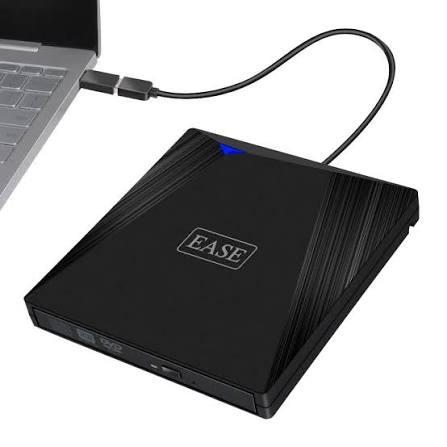
Understanding External CD DVD & Blu Ray Drives
Many modern laptops and desktop computers no longer include built-in optical drives. While digital downloads and cloud storage have changed how people access files, CDs, DVDs, and Blu-ray discs are still useful for storing, sharing, and accessing information.
People may have older software discs, music collections, family videos, or important documents that they want to use on newer computers. Without an internal disc drive, accessing these physical media can become difficult.
An external optical drive provides a convenient solution. It connects to a computer through a USB port and allows users to read compatible discs without installing a drive inside the device.
External CD DVD & Blu Ray Drives are useful for people who need access to different types of optical media. Depending on the model, they can support music CDs, data discs, DVD movies, and Blu-ray content.
What Are External Optical Drives?
An external optical drive is a separate device that reads or writes information using laser technology. Unlike an internal drive, it sits outside the computer and connects through a cable or compatible port.
Most models are designed to be portable. Their compact construction makes them easy to carry between home, office, and other work locations.
Some drives offer reading functions only, while others can also write data onto blank discs. Checking these capabilities before purchasing is important.
Understanding CD, DVD, and Blu-ray Compatibility
Although these disc formats look similar, they have different storage capacities and uses.
CD Drives
Compact discs are commonly used for music, older software, and small collections of digital files. They remain useful when someone needs to access an existing CD collection or transfer its contents to a computer.
DVD Drives
DVDs can store more information than standard CDs. They are often associated with movie collections, software installation discs, and personal video recordings.
A DVD-compatible external drive can help users access these discs on computers without built-in optical hardware.
Blu-ray Drives
Blu-ray discs offer greater storage capacity than traditional DVDs and are commonly used for high-definition video and larger data collections.
However, not every external optical drive supports Blu-ray. Buyers should check the product specifications carefully, especially if they want to play or write Blu-ray discs.
Why Use an External Disc Drive?
External disc drives offer several practical advantages for everyday computer users.
-
Easy connectivity: Many models connect through USB, making setup straightforward.
-
Portable design: Compact drives can be carried between different workspaces.
-
Access to older media: Users can open files stored on physical discs.
-
No internal installation: They are suitable for laptops and computers without an optical drive bay.
-
Useful for backups: Compatible models can help transfer selected files to recordable discs.
These features make external drives a practical option for people who still work with physical media.
Important Features to Check Before Buying
Choosing the right drive depends on the type of discs you use and the tasks you want to perform.
Disc Reading and Writing Support
First, check whether the drive supports reading, writing, or both. If you plan to create discs, make sure the model supports the specific recording formats you need.
USB Connection
Check the connection type and confirm that it works with your computer. Some drives use USB-A, while others may offer USB-C connectivity or require an adapter.
Operating System Compatibility
Review the manufacturer's compatibility information for Windows, macOS, or other operating systems. Software requirements can vary between models.
Portability and Build Quality
A lightweight drive is useful for travel and shared workspaces. Also consider cable quality, physical construction, and whether the device needs an external power source.
Finding Computer Accessories Through IT Networks Trade
When comparing computer accessories, buyers should review product specifications and compatibility before making a decision. itnetworkstrade provides a place to explore IT-related products and business technology options.
Checking available product information can help users identify equipment that matches their computer setup and everyday requirements.
Common Uses for External Optical Drives
External disc drives can support several activities at home and in professional environments.
Students may use them to access course materials or older educational software distributed on discs. Office users can retrieve archived documents and information stored on physical media.
They are also helpful for people who want to digitize music collections or transfer personal photos and videos from supported discs. For these tasks, users should follow applicable copyright rules and ensure they have permission to copy the content.
Conclusion
External optical drives remain useful even as computers become more dependent on digital storage. They provide a simple way to access older CDs, DVDs, and Blu-ray discs without requiring an internal drive.
Before choosing a model, consider disc compatibility, reading and writing support, connection type, and operating system requirements. A suitable external drive can help keep existing media accessible and make everyday computer tasks more convenient.
Frequently Asked Questions
1. Can an external drive play CDs, DVDs, and Blu-ray discs?
It depends on the model. Some drives support CDs and DVDs only, while others also support Blu-ray. Always check the listed disc formats before buying.
2. Do external optical drives work with laptops?
Yes. Many external drives connect to laptops through USB. However, users should confirm port compatibility and operating system support.
3. Can an external disc drive burn data onto DVDs?
Some models include DVD writing capabilities, while others only read discs. Check the product specifications for supported writing formats and functions.

 English
 Arabic
 French
 Spanish
 Portuguese
 Deutsch
 Turkish
 Dutch
 Italiano
 Russian
 Portuguese (Brazil)
 Greek